If your Lenovo ThinkBook 16p G6 ADR (Type 21U0) needs a new battery or you want to reset the connection, you’ll need to remove the internal battery pack. This guide walks you through the process step by step with caution notes to prevent damage.
✅ Before You Begin
- Power off your laptop completely. Do not attempt this procedure in Sleep or Hibernate mode.
- Place the computer upside down on a clean, flat, and static-free surface.
- Prepare a small Phillips screwdriver (M2 × L2.6 compatible).
Step 1: Remove the Lower Case
- Turn the laptop upside down.
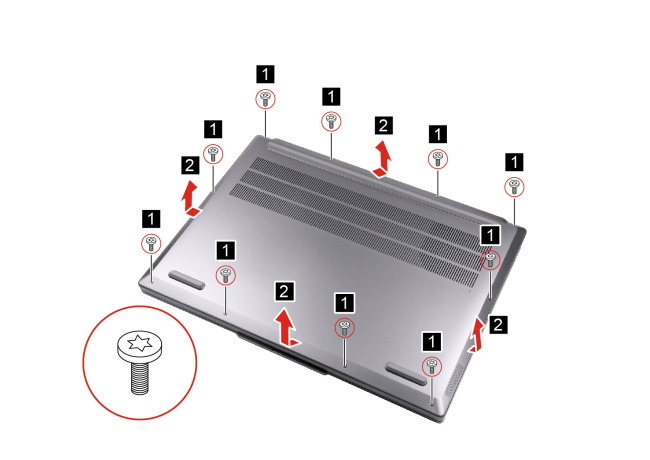
- Remove the 10 screws securing the bottom cover (screw spec: M2 × L2.6, torque force: 1.85 ± 0.15 kgf.cm).
- Carefully pry open the latches and lift off the lower case.
- ⚠️ Caution: Do not force tools between the case edges; this could scratch or bend the chassis.
- ⚠️ Caution: Do not force tools between the case edges; this could scratch or bend the chassis.
Step 2: Disconnect and Remove the Battery
- Locate the battery pack inside.
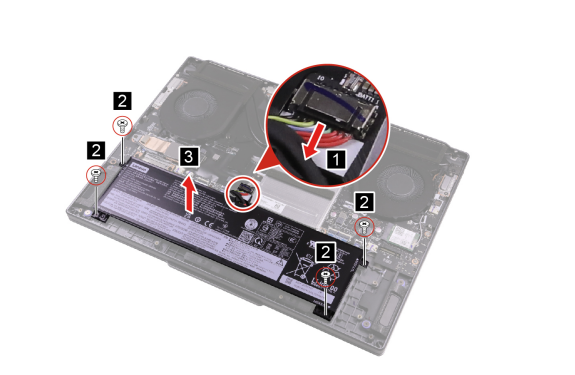
- Disconnect the battery cable from the system board.
- ⚠️ Attention: Use your fingernail to gently pull the connector. Do not pull directly on the cable.
- Remove the four screws securing the battery.
- Lift the battery pack straight out of the chassis.
Final Notes
- Keep the screws in a safe container to avoid losing them.
- If installing a replacement, align the new battery in the same position, reconnect the cable firmly, and secure with screws.
- Always use a genuine Lenovo battery for safety and optimal performance.
📌 Summary
By following these steps, you can safely remove and replace the battery in your ThinkBook 16p G6 ADR. Whether you’re upgrading, troubleshooting charging issues, or replacing an old pack, proper handling ensures your laptop continues to perform reliably.