How to Find Your HP Laptop Battery Model Number
If your HP laptop no longer holds a charge or shuts down unexpectedly, the first step in getting a replacement is to identify the correct battery model.
Ordering the wrong part can lead to compatibility issues, wasted time, and extra costs.
Here’s a simple guide to help you find your HP laptop battery model number.
1. Check the Battery Label (Most Accurate Method)
The easiest way to find the exact model number is to remove the back cover of your laptop and look directly on the battery.
HP batteries always have a white or black label that shows:
- Battery Part Number (e.g.
HT03XL,HS04) - HP Spare Number (e.g.
L11119-855) - Voltage, Capacity, and Watt-hour (Wh)
These numbers are what you should use when searching for a replacement battery online.
2. Use HP Support Assistant (Software Option)
If you don’t want to open your laptop, install the HP Support Assistant software.
It can automatically detect your battery’s details, including the model and health status.
3. Generate a Battery Report in Windows
On Windows 10/11, you can run a simple command to generate a detailed battery report:
powercfg /batteryreport
This report will save as an HTML file and show your battery name, design capacity, and cycle count.
4. Use the HP Service Tag or Serial Number
Every HP laptop has a Service Tag or Serial Number on the bottom case.
You can enter this number on the official HP support website to check the exact battery part your device uses.
Common HP Battery Part Numbers
Here are some examples of popular HP battery codes you might see:
- HT03XL – Common in HP Pavilion and Envy models
- HS04 – Found in many HP 15 series laptops
- L11119-855 – HP Spare code often paired with HT03XL
Final Tips
Always match the part number (like HT03XL) or the spare number (like L11119-855) when ordering a replacement.
This ensures full compatibility with your laptop and avoids issues with charging or fitting.
Example: HP HT03XL Battery Replacement
Once you’ve identified your HP battery model number, the next step is ordering a reliable replacement.
Here’s one of the most common options used in HP Pavilion and Envy laptops:
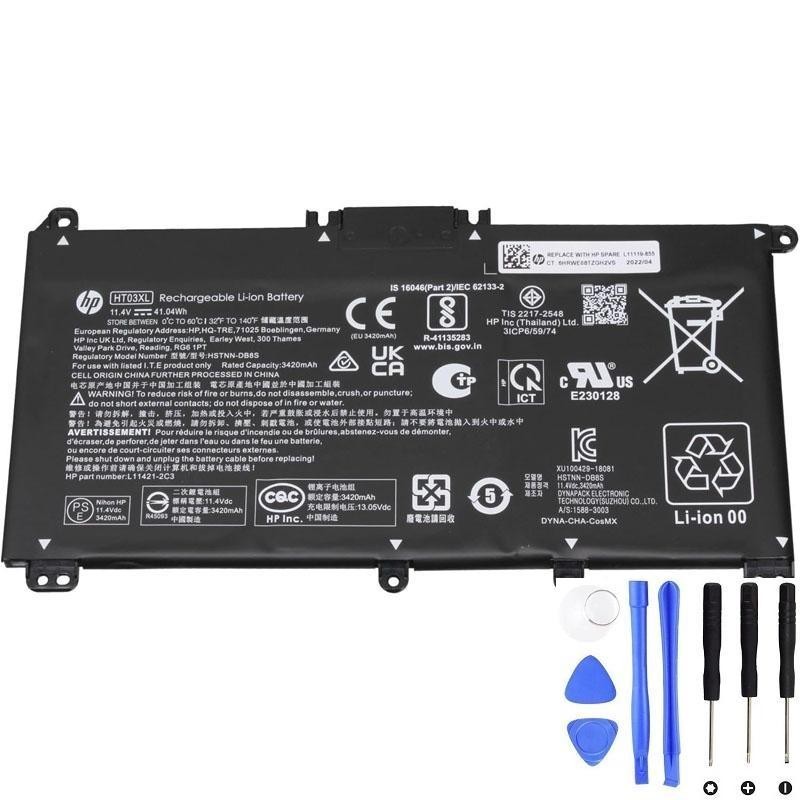
HP HT03XL 41.04Wh Battery – a genuine replacement compatible with popular HP models, including Pavilion 15 and Envy series.
With the correct battery model number, replacing your HP laptop battery is simple, safe, and cost-effective.
Frequently Asked Questions
Q: Where is the HP laptop battery model number located?
A: You can find the model number printed on the battery label (e.g. HT03XL, HS04).
If you don’t want to open the laptop, you can also check it via the HP Support Assistant or a Windows battery report.
Q: Can I replace my HP laptop battery myself?
A: Yes, most HP laptop batteries are user-replaceable with basic tools.
Simply remove the back cover, unplug the old battery, and install the new one.
For internal batteries, extra care is required—seek professional help if unsure.
Q: How much does an HP HT03XL replacement battery cost?
A: A genuine HP HT03XL replacement battery typically costs around $60.
Prices may vary slightly depending on the seller and warranty offered.